
I know…I know. You went through all that trouble learning the new apps. You’ve got your Canva templates, your carefully curated Google Slides, those PDF presentations you purchased from your favorite adult ESL seller↗ on TpT. And here I am, telling you to go back to…gussied-up index cards. Made of paper.
Don’t click away. Hear me out.
There is a specific teaching situation where paper flashcards hold their own against digital tools…in fact, they will get the job done better. And that situation is one-on-one or small-group instruction. One student. Two. Okay, maaaybe three.
If you’ve got 25 students, then YEAH! Get the big screen up and display it large. Nobody’s arguing with that. But if you’re sitting around a table with a small handful of students? A stack of physical cards is more flexible, more tactile, and more engaging than anything you can pull up on a laptop.
Here are six reasons to use actual paper flashcards with your small groups of adult ESL students.
Your students are already tired of looking at screens
Remember when learning meant picking up a flashcard, flipping it over, and just thinking? No notifications, no pop-ups, no rabbit holes. Flashcards bring back that calm, focused experience.
In a world of doom-scrolling, constant pings, and screen fatigue, there’s something so refreshing about putting a physical flashcard in a student’s hands. There’s no app to download, no battery to charge, and no login required. Instead, you’ve got your students and flashcards for whatever they’re practicing.
I’ve watched students who glaze over in front of a screen snap to attention the moment something physical lands on the desk in front of them. It’s not magic. It’s just…different. And different gets noticed.
I’m also not saying that they won’t be sneaking peeks at their phones. They want those dopamine hits they get from screens because that stuff is frankly addictive (I say as I glance at the phone right next to me). But do you want to be the one giving them another screen to look at when it’s not necessary?
Small group + physical materials = an intimate experience a screen can’t match
Here’s something nobody talks about enough: a screen creates distance. Even in a tiny group, when there’s a glowing rectangle in the room, it becomes the authority. The teacher steps back. The students look at the device, not each other, and not you.
Flashcards, on the other hand, do the opposite. When you slide a card across a table to a student, it’s nothing like clicking next on the screen. Instead, it becomes personal because you’re not broadcasting. You’re interacting. There’s a closeness to that exchange that a projected slide simply can’t replicate.
For adult ESL students who may already feel vulnerable practicing pronunciation or struggling with vocabulary in front of others, that intimacy matters…a lot. It signals that this is just between us. We’re going to figure this out together. Right here, right now, at this table.
That’s not a vibe you get from a slideshow.
The pace belongs to your student, not your presentation
Here’s the thing about small-group instruction…and I’m going to whisper this part, okay? You don’t need a presentation. You need a conversation. And flashcards move at conversation speed.
Your student, let’s call her Fatima, is having a rough day. She keeps confusing /b/ and /p/, and the frustration is written all over her face. With a digital presentation, you’re clicking forward and it feels, well, clinical, right? With a flashcard, you can hold that one card. Flip it, flip it back, set it aside, come back to it. The card goes at her pace, not the slide’s pace.
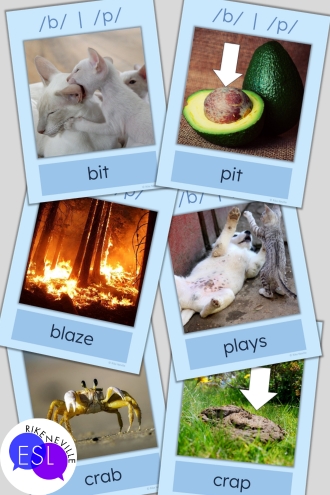
Now swap Fatima out for Jae-won, who is breezing through everything you put in front of him. You slide a harder flashcard into the stack on the fly. You don’t have to edit a file. No switching apps. You just…add a card, and it’s as simple as that.
That kind of real-time flexibility? You can’t replicate it on a screen without a lot of fiddling. With flashcards, you can easily set aside the ones they need more review with. You can mix up the order. Try doing that with a digital presentation. I mean, yeah, you can, but it takes a heck of a lot more time. Plus your students are left sitting there watching you get things sorted.
Peer practice gets easier when students can hold the materials
Tactile, low-tech tools like flashcards also make peer practice genuinely easy. Students can quiz each other, sort cards, play matching games, and build fluency together without a single screen in sight.
Think about what happens when you hand two students a stack of flashcards and say, “Quiz each other.” One holds, one answers, then they switch. That’s independent, student-driven practice. You can circulate, take notes, maybe even grab a sip from your water bottle.
Now try asking two students to “practice together” using a shared laptop screen. What usually happens? Yeah, you guessed it. One student ends up in charge of the keyboard, and the other student sits there, an observer. That’s not peer practice, is it?
You already know how to use flashcards, and so do your students
C’mon. Flashcards don’t need a tutorial. There is zero learning curve. You hand a student a flashcard and they know exactly what to do with it. Flip it. Read it. Answer it. Identify the picture. There are lots of kinds, but their use is intuitive.
This matters more than people acknowledge, especially with adult students who may feel self-conscious about technology they haven’t fully mastered yet. The last thing you want is for a student to spend half the session figuring out an interface instead of, you know, learning.

With flashcards, you skip all of that and get straight to the point. Which is what your students came for. (Well, that and your humor and energy.)
One last thing: No Tech Failures
The wifi goes down. The projector decides today is the day it simply won’t connect. The provided laptop has an update that absolutely cannot wait (or interrupts right in the middle of your lesson). You know how it goes. We all do.
A flashcard has never needed a software update. Are you in an under-resourced program (think limited devices, spotty internet, one shared computer for the whole department)? Then you know that having a tool that just plain functions reliably is not a small thing. It is the whole thing.
Right or wrong, we’ve all been burned by tech at the worst possible moment. A deck of flashcards never let me down mid-lesson. Neither has anything from my task card library. I can’t say the same for anything that requires tech. Can you?
The Bottom Line
Digital tools are great. I love them. I love creating them. I’m certainly not throwing my laptop out the window (just yet). But if you’re teaching one, two, or three students, a stack of physical flashcards gives you something no app can offer. And that’s intimacy, flexibility, tactile engagement, and zero tech drama. Your small group doesn’t need a presentation. They need you. (yes, even on your bad days) And a deck of flashcards is a pretty great way to show up for them.
That’s it from me. See you in the next post!
get resources
Browse my Minimal Pairs Pronunciation Flashcards in my TpT store.
Browse my Adult Life Vocabulary Flashcards in my TpT store.